Messaging program
SMS terms & consent
How the TruDOT Compliance Alerts text-message program works — who receives messages, how you agree to them, what they say, and how to stop them at any time.
Effective September 11, 2026 · Last updated October 18, 2026
The short version
TruDOT sends text messages about DOT compliance documents and deadlines to the drivers of the motor carrier that enrolled them, and only with their consent. Message frequency varies. Message and data rates may apply. Reply HELP for help and STOP to unsubscribe at any time. Consent is not a condition of employment or of any purchase. We never sell or share your mobile number or your consent with anyone for marketing.
1.Who sends these messages
The program is called TruDOT Compliance Alerts and it is operated by Umapachi LLC (TruDOT), a compliance recordkeeping service used by motor carriers. Messages come from the TruDOT number your fleet was issued. TruDOT sends them on behalf of the carrier that employs or contracts with you — your fleet’s office sees the same reminders in the TruDOT app.
2.Who receives messages
Drivers of a carrier that uses TruDOT whose mobile number and consent are on file — nobody else. Your fleet’s office sees the same reminders in the app and by email, not by text. We do not buy, rent, or message purchased phone lists, and we do not send marketing or promotional texts through this program.
3.How you opt in
Saying no costs you nothing
Text reminders are optional and separate from everything else. You do not need to agree to them to be hired, to keep driving, to be paid or dispatched, to have a driver file in TruDOT, or for your carrier to use TruDOT — and your carrier does not need your consent to open or keep its own account. A driver who declines has exactly the same compliance record and the same deadlines; the office simply reaches them another way. Consent is never a condition of employment or of any purchase, and you can withdraw it at any time.
You will only get texts from TruDOT if you agreed to them in one of the following ways. In every case the agreement is to this program only — reminders about your own compliance documents — and never to anything else, and it can be withdrawn at any time (see section 7).
- You text us first. Texting the TruDOT number your fleet was issued — sending START, or a photo of your medical card so it gets filed — is consent to receive our reply and the reminders described here. Nobody else is involved. If we don’t recognize your number yet, we reply once asking for your fleet’s TruDOT code (your office has it, and it is on the consent form) so your document reaches the right fleet; after that we remember.
- You tick “Yes” on the consent form and sign it. The form is published at /legal/consent-form. It is a standalone page with a Yes box and a No box — not part of any hiring, onboarding or employment paperwork — and your carrier keeps the signed original.
- You tell your fleet’s office directly. Staff read you the same disclosure and record who took your consent and when.
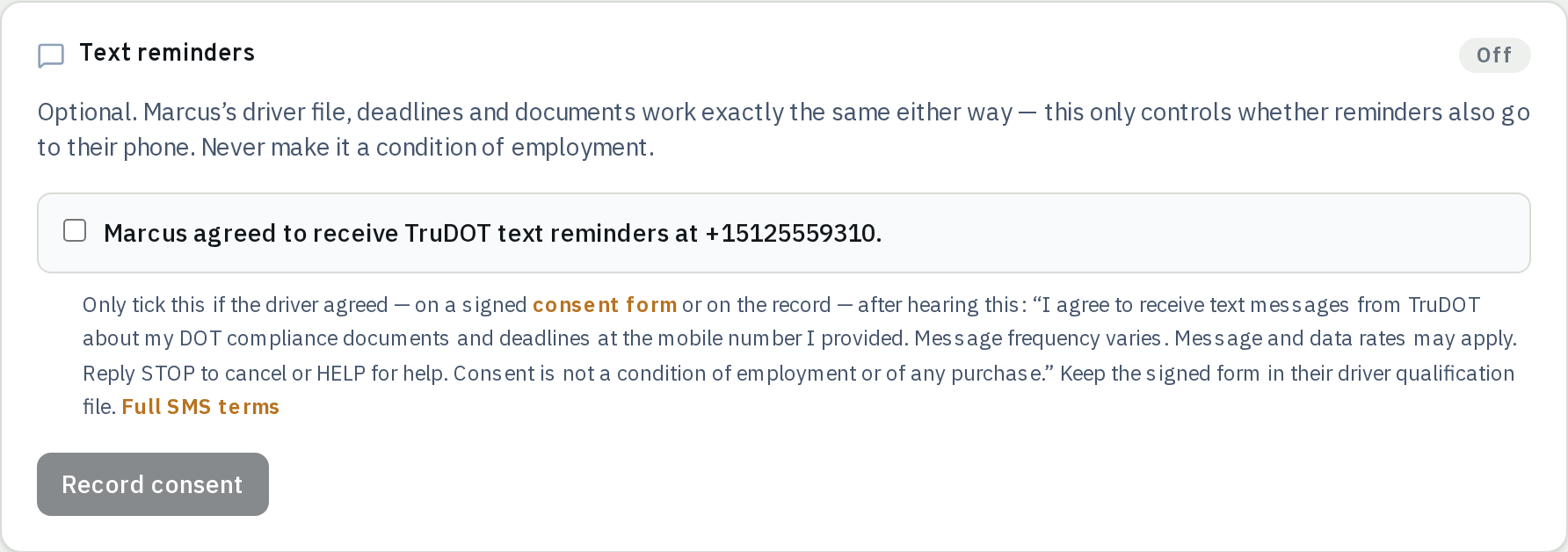
Under the last two, a staff member then records your answer on your driver record in TruDOT — a separate, deliberate step on a record that already exists, in a panel whose only purpose is this consent. Adding a driver to TruDOT never turns text reminders on, and neither does importing a fleet from a spreadsheet: the box below starts empty for every driver, every time.
The disclosure you agree to
I agree to receive text messages from TruDOT about my DOT compliance documents and deadlines at the mobile number I provided. Message frequency varies. Message and data rates may apply. Reply STOP to cancel or HELP for help. Consent is not a condition of employment or of any purchase. See trudot.app/legal/messaging and trudot.app/legal/privacy.
Carriers using TruDOT agree in our Terms of Service to obtain that consent before entering a driver’s mobile number, to keep proof of it, and never to make it a condition of employment. This is the screen where your office records it — its own panel on your driver record, unchecked until somebody has your consent in hand, and changing nothing else about your file:
4.What we send
Transactional compliance messages only — reminders about documents and deadlines tied to your own driver file, and confirmations when a document you sent in is filed. Never marketing.
| When you get it | What it says |
|---|---|
| Once, right after you are enrolled (opt-in confirmation) | TruDOT: You're set up to get compliance-document reminders for your fleet. Msg & data rates may apply. Reply HELP for help, STOP to unsubscribe. |
| When one of your documents is coming due or is overdue | TruDOT reminder: your Medical certificate is due in 14 days. Please send an updated document or contact the office. |
| After you text a photo of a document in, once it is filed | ✓ Received your medical certificate (R. Coleman) and filed it. Your med cert is now valid through 03/14/2027. |
| After you text a document in that needs a person to check it | Got it — your medical certificate is in review and the office will confirm shortly. |
5.How often
Message frequency varies and depends on how many of your documents are coming due. Reminders fire as a deadline approaches — at 60, 30, 14, 7 and 1 days before it — and each reminder is sent once. Most drivers receive fewer than six messages a month; a driver with nothing expiring may get none at all. Replies to messages you send us are not counted.
6.What it costs
TruDOT does not charge drivers for these messages. Message and data rates may apply from your mobile carrier, depending on your plan.
7.How to stop messages
Reply STOP to any message from us — or send STOP, STOPALL, UNSUBSCRIBE, CANCEL, END or QUIT to the TruDOT number your fleet was issued. You will get one confirmation message, and then no further texts from the program. You can also email support@trudot.app or ask your fleet’s office to turn SMS off on your driver record.
Opting out of texts does not affect your compliance obligations or your driver file — your fleet’s office still sees the same deadlines in TruDOT, and will reach you another way. If you change your mind, reply START to the TruDOT number your fleet was issued to resume.
8.How to get help
Reply HELP to any message for instructions, email support@trudot.app, or call (425) 675-5732. Questions about a specific deadline are usually fastest through your fleet’s office, which sees the same record.
9.Delivery
Delivery is not guaranteed. Mobile carriers are not liable for delayed or undelivered messages, and neither TruDOT nor your carrier can guarantee that a reminder reaches you. Text alerts are a convenience on top of the record in TruDOT — they do not replace it, and they do not transfer responsibility for a deadline to us.
10.Your number and your privacy
Your mobile number is used to send you the messages described here, to match documents you text in to your driver file, and for nothing else. Messages are delivered through Twilio, our messaging provider, which processes them on our behalf.
Mobile opt-in is never shared
No mobile information will be sold or shared with third parties or affiliates for marketing or promotional purposes. Text messaging originator opt-in data and consent are excluded from every category of information sharing described in our Privacy Policy; this information is not shared with any third parties.
11.Changes and contact
We may update these messaging terms; the effective date at the top changes when we do, and material changes are announced in the app before they take effect. Questions about this program: Umapachi LLC, 11335 NE 122nd Way, Suite 105, Kirkland, WA 98034, United States — support@trudot.app.